![BH_Asset 06_Linear-ALT.png]](https://guides.bridgehaul.com/hs-fs/hubfs/BH_Asset%2006_Linear-ALT.png?height=40&name=BH_Asset%2006_Linear-ALT.png)
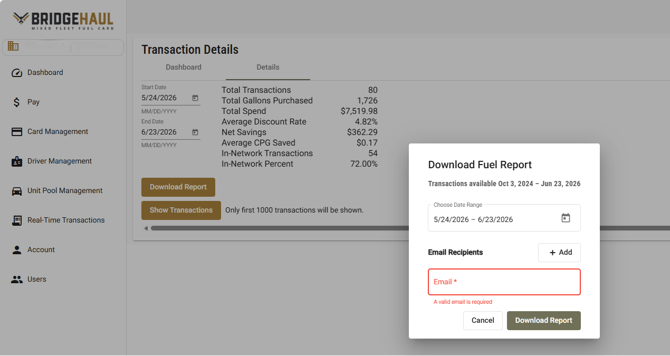
After logging in, open the Details tab from your dashboard to access transaction reporting.
To download a detailed transaction report, click Download Report within the Details section. Next, select the date range you want to review and choose the email address where the report should be sent. After you submit the request, the system will generate the report and deliver it to the selected email address.
Once the report is received, you should have the following sheets within the report:
- Transactions
- Transactions by Chain
- Transactions by Driver
- Transactions by State
- Transactions State Total (Most commonly used for IFTA)
You can also sort, filter, and analyze the data based on your reporting needs.