
How to add additional funding options.
First, you should login to your Carrier TMS Account. Once in you would go to "Factoring" tab and click on "Funding Accounts".
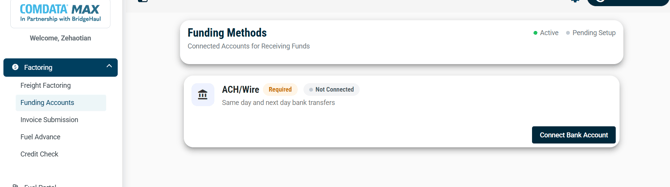
You should see your ACH/ Wire Bank account already setup. There are 2 additional payment types Instant Payouts, and OnRoad Fuel Card.
- Instant Payouts- Deposits made thru your debit card. This is similar to Venmo or Zelle transactions.
- OnRoad Fuel Card- This is a balanced based card that can only be used when BridgeHaul adds funds to the card. You can request funding onto the card as a Factoring client or as an assigned carrier to BridgeHaul loads. Funds typically appear within 1 hour of processing.
Click on "add or apply" button to proceed to the next steps. Only if your account offers RTP will this option appear.
How to Modify a connected account.
To change your bank account, click "Modify Bank Account."
*If this is grayed out you will need to contact BridgeHaul Support. We do have this typically locked for added security*
You will have to enter in authorized account representative information:
- First & Last name
- Date Of Birth
- Last 4 digits of the SSN.
Once you click "submit" you will have to log into your online banking account.
To change your Instant Payouts account click "Edit Debit Card"
You will have to enter in authorized account representative information:
- First & Last name
- Date Of Birth
- Card Number - Expiration Date- Security Code
Click "Confirm Changes" when the information above has been completed.